

Help Center
Starlink Mini Battery Lite
STARLINK MINI • OFFICIAL ACCESSORY
Ravion Battery Lite
Ravion Battery Lite
SLM-128
Quick Start Guide & Complete User Manual
📄 Support Article
Updated: April 2026
Introduction
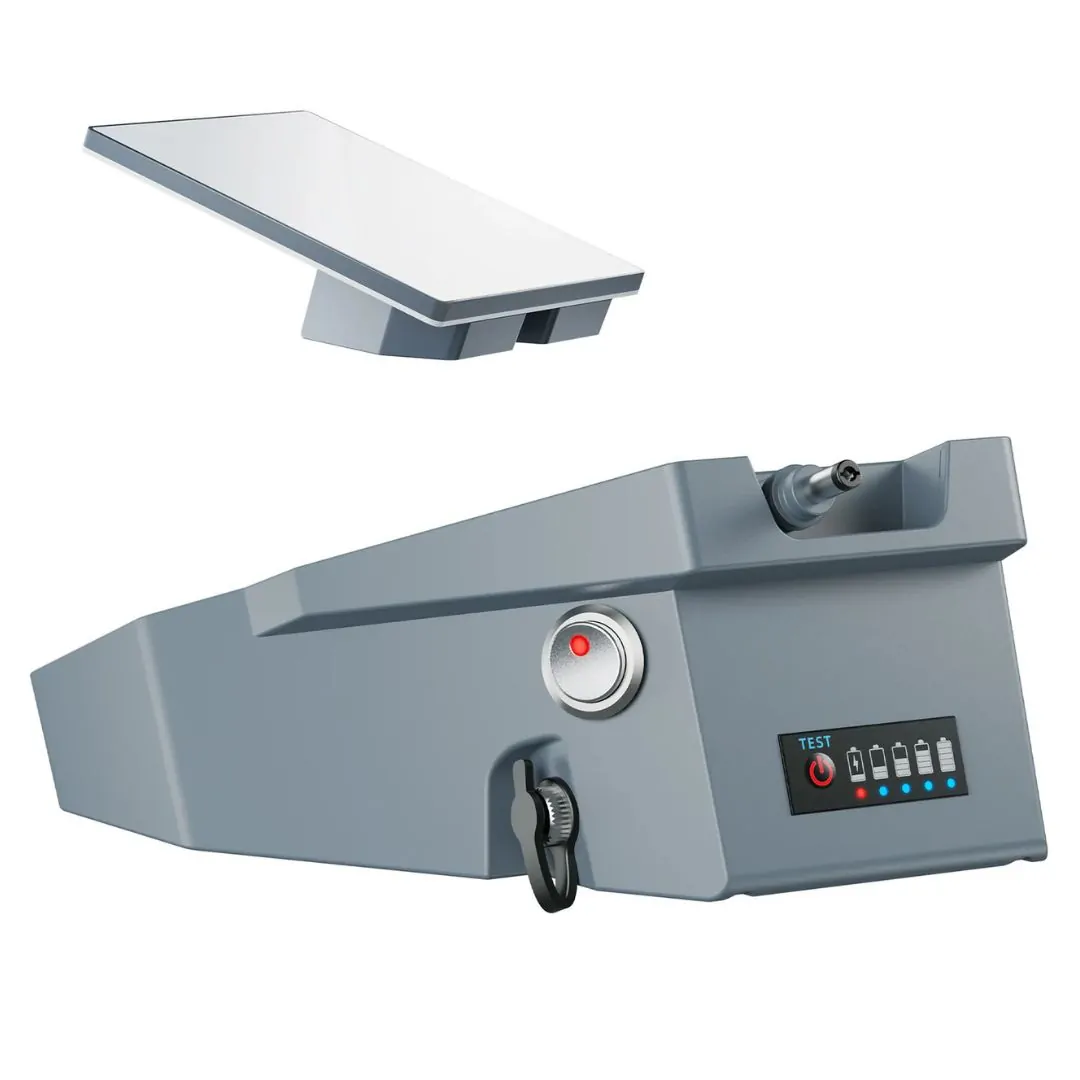
Meet the Ravion Battery Lite (SLM-128), a high-capacity, lightweight power solution engineered exclusively for Starlink Mini.
With a 99Wh NCM battery, Ravion delivers 4-6 hours of continuous runtime, keeping your internet connection alive in the most remote locations.
Key Features
- • Clip-On Design – Secure attachment directly to Starlink Mini
- • IP65 Waterproof & Dustproof – Rugged outdoor protection
- • Battery Level Display – Real-time monitoring
- • Pass-Through Charging – Power Starlink Mini while charging the battery
- • Smart Safety Protection – Overheating, overcharge & short-circuit protection
- • DC Charging Port – Use original Starlink Mini charger
- • Universal Mounting – ¼”-20 threaded hole for tripods & stands
Technical Specifications
| Feature | Details |
|---|---|
| Product Name | Ravion Battery Lite |
| Battery Capacity | 99Wh |
| Battery Type | NCM Lithium Battery |
| Runtime | ~4-6 hours with Starlink® Mini |
| DC Output | 25.2V |
| USB-C PD | 5V-3A, 9V-3A, 12V-2.5A, up to 65W (Input/Output) |
| Dimensions | Compact clip-on design |
| Weight | 1.75 lbs (lightweight) |
| Waterproof Rating | IP65 |
| Operating Temperature | -20°C ~ 60°C |
| DC Input | 29.4V 2A |
Setup Instructions
- Place the Starlink Mini face down on a flat surface.
- Detach the original stand that comes with the Starlink Mini.
- Remove the original Ethernet port cover from the Starlink Mini.
- Install the rubber sealing gaskets.
- Align the Ravion Battery Lite with the back of the Starlink Mini and gently slide until you hear a “click”.
- Press the Power Button once. The LED will light up and Starlink Mini will automatically power on.
- Setup complete. Starlink Mini is now powered by Ravion.
Device Overview
- Power Button & LED Indicator
- Battery Level Display
- DC Output Port (5.5mm × 2.1mm)
- DC Input Port (5.5mm × 2.1mm)
- USB-C PD Port (65W charging, bidirectional)
- Clip-On Mounting Mechanism
- Rubber Sealed Gaskets for IP65 protection
What’s In the Box
- ✔ 1 × Ravion Battery Lite (99Wh)
- ✔ 1 × DC-to-DC Cable (for original Starlink charger)
- ✔ 1 × Type-C to Type-C Cable
- ✔ 1 × Rubber Sealed Gaskets
- ✔ 1 × User Manual
Usage Instructions
🔋 Charging the Ravion Battery
- Use a USB-C PD charger (up to 65W recommended). Full charge in ~2 hours.
- Or connect the original Starlink Mini charger with the included DC cable.
- Pass-through mode: charge the battery while powering Starlink Mini at the same time.
⚡ Powering Starlink Mini
Press the Power Button twice to toggle DC output on/off.
📱 Works as a Power Bank
Use the USB-C PD port to charge phones, tablets, or laptops (up to 65W output).
Troubleshooting
- Battery not turning on? → Hold power button for 2 seconds or connect to charger.
- Starlink not powering? → Check DC cable connection is flush and secure.
- Hard to detach? → Gently slide a thin plastic card into the clip gap and release.
- Battery runtime short? → Verify Starlink firmware power usage (25–40W).
Safety & Maintenance
- IP65 splash resistant – Do not immerse in water.
- Keep away from fire, direct heat, and sharp impacts.
- Store between -20°C ~ 45°C for best performance.
- For long-term storage, keep battery around 50% charge.
Need further assistance with your Ravion SLM-128?
Our Global Satellite support team is available 24/7.
📞
📞
📧
+1-954-459-3002
Main Support Line
+1-954-854-3389
Technical Support
support@globalsatellite.us
🌍 www.globalsatellite.us • Your Trusted Satellite Communications Partner